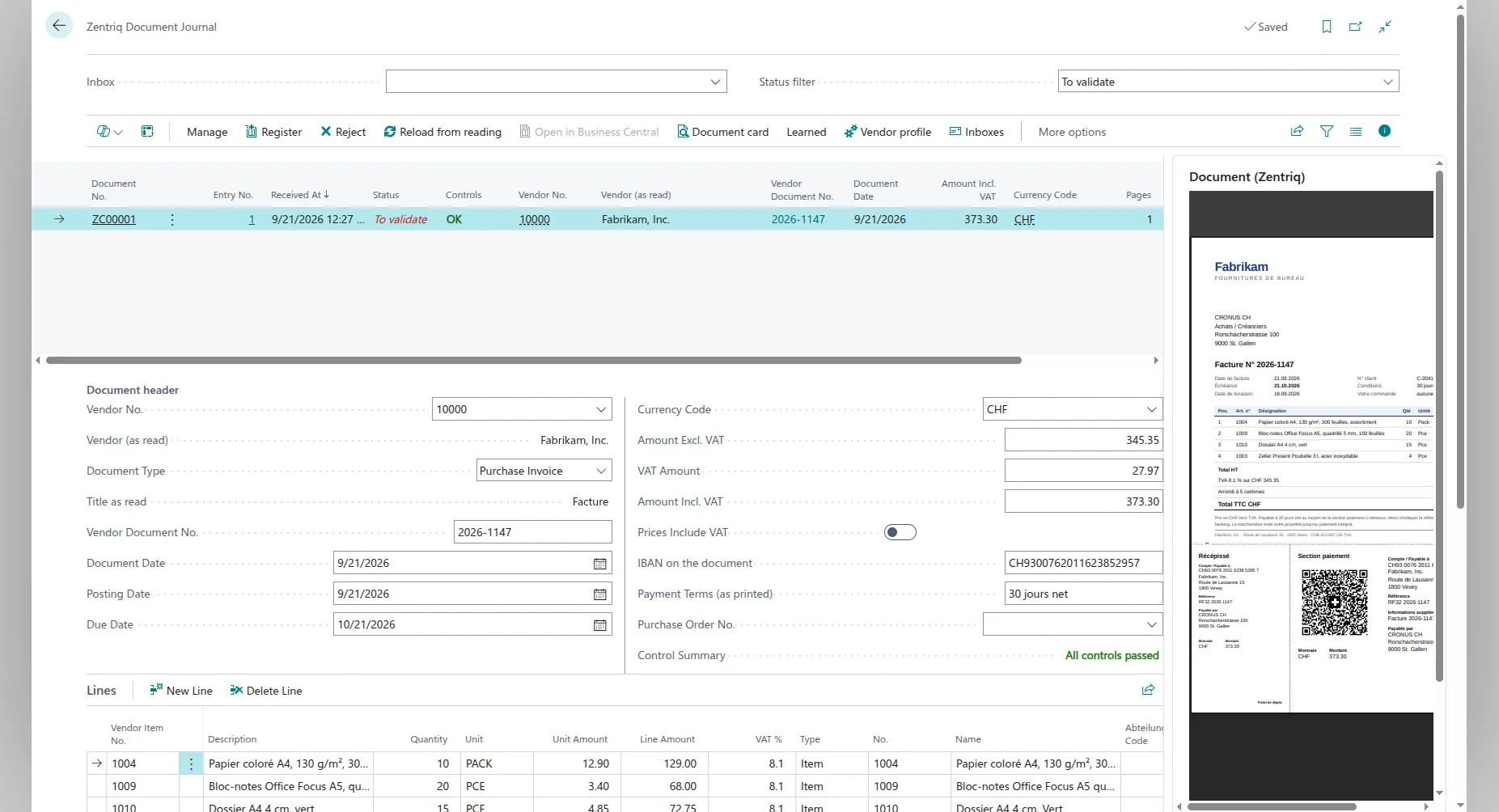
Your vendors send their invoices to your company's Zentriq address. Zentriq Capture reads each one, matches it to your vendors, items and accounts, checks it inside Business Central, and leaves it in the Zentriq Document Journal for you to register as a purchase invoice.
Reading, checks and a purchase invoice you post. No approval routing, no payment runs.
One subscription for your whole team, no matter how many users.

The typing part of accounts payable: reading the invoice, finding the vendor, placing the lines and checking the amounts. What comes after stays in your hands.
Before you register, eleven controls run inside Business Central: the lines against the total, the VAT against the line rates, the Swiss QR-bill, the IBAN against the vendor's bank accounts, an invoice already in Business Central, and whether every line can be posted. A failed control is shown on the document, and you decide.
Each line is placed on an item or a G/L account from your own Business Central data: the way you placed it for this vendor before, the vendor's article number and your item references, or the inbox's default account. You can change any line before you register.
Zentriq Capture reads, matches and checks, and Register creates the purchase invoice. It does not run an approval workflow with approvers and delegation, and it does not do payment runs. The purchase invoice is an ordinary Business Central document, so the approval and posting rules you already have there still apply to it.
Based in Switzerland? Zentriq also reads the Swiss QR-bill into Business Central.
Want the full picture, from capture to payment? Read our guide to accounts payable automation in Dynamics 365 Business Central.
The established capture tools (Continia, Kofax, ReadSoft) ask you to configure a layout per supplier. Zentriq reads the invoice as it comes.
The AI reads any layout from the first document, so a supplier you have never invoiced before works right away. Nothing to configure, and nothing to repair when a supplier changes their format.
Each document shows the result of eleven controls in plain words: the lines against the total, the VAT, the Swiss QR-bill, the IBAN against the vendor card, duplicates. A changed bank account or an invoice sent twice is caught before it becomes a purchase invoice.
Zentriq Capture is a Business Central app from Microsoft AppSource. The journal, the controls and the purchase invoices are in Business Central, so there is nothing else for the team to open.
Send it to your company's Zentriq address, or ask your vendors to send it there directly.
Vendor, invoice number, dates, currency, tax and each line with its description, quantity and unit price.
UBL, CII, Factur-X and ZUGFeRD invoices are read from their own XML data, with no AI involved.
A vendor credit note is recognised from its printed title or its negative total and prepared as a purchase credit memo, not as an invoice.
Vendor, invoice number, document and due date, currency, tax, and each line with its description, quantity and unit price.
The vendor is found in your own Business Central data from the VAT number, the IBAN or the name, including names you confirmed before. If nothing matches, you pick the vendor yourself, once.
The way you placed this vendor's lines before, the vendor's article number and your item references, or the inbox's default account. You can change any line before you register.
The payment terms and the due date printed on the invoice are read, and the due date is carried onto the purchase invoice.
On a Swiss QR-bill, the IBAN, the reference and the amount are read, checked and carried onto the purchase invoice. When the IBAN is not on the vendor card yet, Zentriq offers to add it.
The PDF is attached to the purchase invoice in Business Central and stays with it when it is posted. The Zentriq Document Journal keeps each document with what was read from it.
Each Business Central company gets its own address. Forward invoices to it, or ask your vendors to send them there.
It appears in the Zentriq Document Journal, read and matched, next to its PDF, with the result of every control.
Register creates the purchase invoice or credit memo with the PDF attached. You post it in Business Central, as usual.
Free to start: 8 documents. After that, an annual subscription priced on your volume.
The people who key supplier invoices into Business Central. The invoices arrive read and checked: check the vendor and the lines, register, then post.
An IBAN that is not on the vendor card, or an invoice that is already in Business Central, is flagged before a purchase invoice is created.
A photo of an invoice e-mailed from a phone to the Zentriq address is read like a PDF, with no scanner involved.
The source PDF is attached to the purchase invoice in Business Central, and the Zentriq Document Journal keeps each document with what was read from it and the result of its controls.
| Step | By hand | With Zentriq Capture |
|---|---|---|
| Getting the invoice into BC | Open a purchase invoice, type the vendor, then every line | It arrives by e-mail, read and filled in |
| Finding the vendor | Look up the number, search by name | Matched from the VAT number, the IBAN or the name |
| Checking totals and VAT | Add up the lines and check the VAT by hand | Checked against the lines and their rates |
| A changed bank account | Compare the IBAN with the vendor card by eye | Flagged when the IBAN is not on the vendor card |
| A supplier you have never invoiced | The same typing as always | Works from the first invoice, no template |
| Posting | You post it | You post it, nothing posts on its own |
It removes the keying. Invoices sent to your company's Zentriq address are read: the vendor, the dates, the VAT, the currency and every line. Zentriq matches them to your vendors, items and G/L accounts and runs its controls inside Business Central. You check each document in the Zentriq Document Journal and register it, which creates a purchase invoice or credit memo with the source PDF attached. You post it in Business Central.
No. Register creates the purchase invoice or credit memo unposted, in your own Business Central, and a person posts it there.
No. Zentriq does not route invoices to approvers, it has no delegation or substitute rules, and it does not build payment journals or bank files. It stops at a draft purchase invoice. Because that draft is an ordinary Business Central document, the approval and posting rules you already have in Business Central still apply to it.
Eleven, inside Business Central: the lines add up to the total, the VAT matches the line rates, the Swiss QR-bill amount matches and its checksums pass, the IBAN is one of the vendor's bank accounts, the invoice is not already in Business Central, every line has an item or account that Business Central will post, the values read appear in the document text, the document type matches its printed title, the invoice fits the vendor's usual profile, and, once registered, the purchase invoice matches the total read. A failed control is shown on the document; you decide whether to register.
PDF files, images (JPEG, PNG) and electronic invoices in XML (UBL, CII, Factur-X, ZUGFeRD), sent as e-mail attachments. Scans and photos taken with a phone work, and multi-page documents are supported.
No. Zentriq Capture is its own Business Central app, with its own subscription and document allowance. It installs from Microsoft AppSource together with Zentriq Core and works without the Agent.
A subscription per company, refilled every billing period, priced on the number of documents you receive. There is a free tier of 8 documents to start, no card. Ask us and you get a firm price.
Documents travel over TLS and are processed in the EU: our backend and file storage are in Frankfurt, and PDFs and images are read by Claude through AWS Bedrock in EU regions. Your documents are not used to train AI models. Purchase invoices are created in your own Business Central, through the connection you approve, within your Business Central permissions. Our privacy policy has the details.